


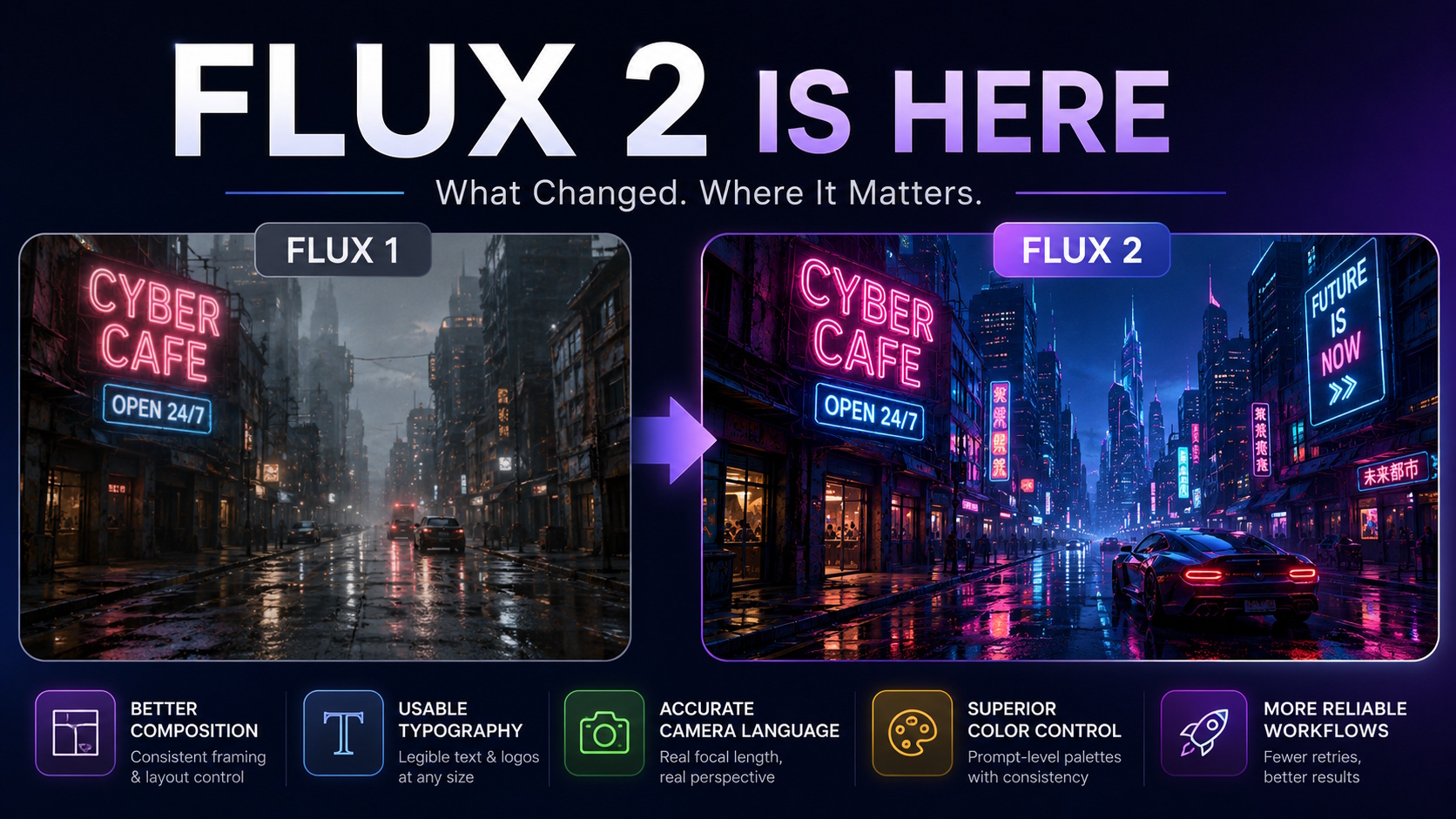
Flux was the first open image model in 2024 to feel commercially usable without a heavy fine-tune. The original FLUX family covered the speed-versus-quality range with Schnell, Dev, and Pro variants, and most teams settled into a routine around them. Flux 2 arrived at the end of last year and shifted that routine in ways that are worth understanding before you swap your workflow over.
This is what changed in practice, and where the upgrade actually pays off.
The composition layer is the headline change
The most visible improvement in Flux 2 is composition control. The original FLUX understood scene description well, but it relied on user discipline to keep compositions stable. Two prompts that read the same to a human could produce noticeably different framings.
Flux 2 reads compositional intent more reliably. A prompt that specifies a rule-of-thirds layout with a subject at the left third produces that layout consistently. A prompt that asks for a centered hero shot stops drifting into off-axis variants. The reliability is what makes the upgrade matter for production work, not just hobbyist exploration.
A complete walkthrough on writing compositional prompts that work specifically with this model is in Pixel Dojo’s Flux 2 prompting guide.
Typography went from broken to usable
Text rendering in the original FLUX was the standard “almost legible” output that every diffusion model produced. Words came out close to right, with letters that wouldn’t survive a sign maker’s inspection. Logos were even worse.
Flux 2 ships with text rendering that holds up at signage scale. Multi-word phrases on storefronts, posters, and product labels render legibly without manual correction. Single-word logos with stylized letterforms are close enough that a quick vector trace produces a usable asset. This wasn’t true a year ago.
The practical impact: product mockups, marketing comps, and packaging concepts can be drafted in Flux 2 directly, instead of being generated as base scenes and then composited with real text in Photoshop or Figma.
Camera language reads more consistently
Older FLUX models understood photography terms (35mm, shallow depth of field, golden hour) but applied them loosely. A prompt asking for an 85mm portrait at f/1.4 would produce something portrait-like, but the focal length feel wasn’t honored.
Flux 2 honors focal length more reliably. The compression you’d expect from 85mm shows up. Wide-angle distortion at 24mm shows up. This matters for anyone using image generation for storyboarding or look development, because the camera language stops being decorative and becomes functional.
Color control finally works at prompt level
Color direction in earlier models required either fine-tuning or LoRA stacking to produce repeatable palettes. Prompts that specified “muted earth tones” produced something earth-toned but not consistent across regenerations.
Flux 2 takes specific color palette descriptions and applies them more accurately. A prompt asking for a Wes Anderson palette produces that palette. A request for cyberpunk neon with desaturated background produces that contrast. The variance between seeds is smaller, which makes the model usable for batch work where color consistency matters.
Where the upgrade doesn’t help much
A few categories where Flux 2 is roughly equivalent to the older variants:
Pure abstract art generation. If you’re producing non-representational work, the compositional improvements don’t add much. The older Pro variant is still fine and uses fewer credits.
Heavy stylization toward a single look. If you’ve already fine-tuned a LoRA on the original FLUX, that LoRA isn’t ported. Re-training takes time, and the gains may not be worth the migration.
Face fidelity in tight portraits. The improvements here are incremental rather than dramatic. If you have a face-focused workflow that works in the old model, it’ll work the same in the new one.
Credit economics and when the upgrade is worth it
Flux 2 runs at a higher credit cost per generation than the original Dev variant. The math becomes favorable when you’re doing work that previously required multiple regenerations to land. If your typical workflow involves generating 4-6 variants and picking the best, Flux 2’s higher per-generation reliability often nets out cheaper because you generate fewer variants per usable output.
The break-even depends on your task type. Composition-heavy work (storyboards, layouts, product mockups) tips toward Flux 2. Pure aesthetic exploration tips toward keeping the old models for now.
What prompt patterns ported over
Most of the prompt structure that worked in the original FLUX still works in Flux 2. The model understands the same lighting vocabulary, the same lens descriptions, the same composition references. The difference is that it applies them more consistently. So existing prompt libraries don’t need to be rewritten from scratch; they need to be tested for which prompts now produce more reliable output and can be promoted to defaults.
A few prompt habits worth dropping:
Over-specification of negative prompts. Flux 2 produces cleaner default output, so the long negative prompt lists that compensated for older model failures are usually unnecessary now.
Reliance on weight syntax. The weighting syntax that boosted certain terms in older models has reduced impact in Flux 2. The model reads natural-language emphasis instead.
Multi-pass composition workflows. The old habit of generating a base scene and then upscaling-plus-refining for composition tweaks is less needed. Flux 2 typically lands the composition in the first pass.
What this means for production teams
Teams running paid creative work should test Flux 2 against their current FLUX-based pipeline on a small sample of representative jobs. The migration question isn’t whether Flux 2 is better in the abstract; it’s whether the per-job time savings and quality improvements justify the credit cost increase and the regression testing needed to swap models.
For new projects starting from scratch, defaulting to Flux 2 is reasonable. The composition reliability, typography quality, and color accuracy compound over a body of work. The original FLUX family is still fine; Flux 2 is just less work to get a usable output from.
The image generation category has hit a maturity point where the gap between “the model can do this” and “the model reliably does this” has narrowed. Flux 2 is the cleanest example of that shift in the open ecosystem, and it sets the bar for what other releases need to match next.