A post with more likes is easy to notice. Understanding what to publish next takes a closer look at the accounts behind those interactions and the posts they return to.
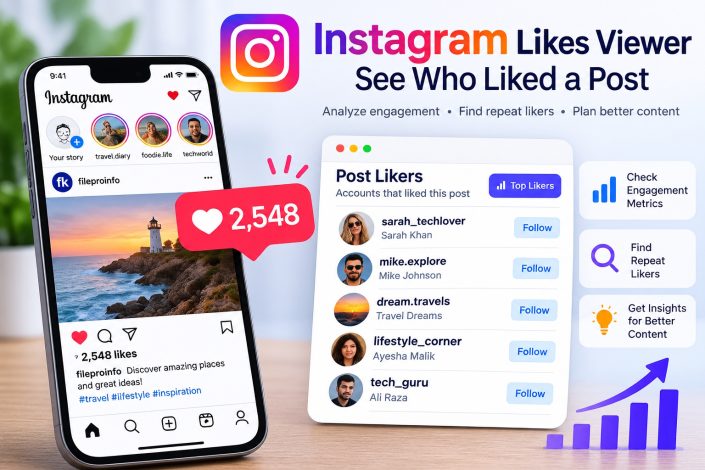
To see who liked an Instagram post, open it and tap the like count or the “Liked by … and others” text when available. The available list identifies accounts associated with that post. It does not explain why they liked it.
For creators, bloggers, and independent social media managers, reviewing those accounts across selected posts can suggest useful content experiments. According to DolphinRadar, its Instagram Likes Viewer supports browsing recent posts from public profiles and viewing available likers, with paid options for search, Top Likers, and export.
The useful starting point is a specific question: which content brings familiar accounts back, and what should you test next?
What Instagram Post Likes Data Actually Shows
A liker list is the available set of accounts shown as having liked a particular post. A like count is the displayed total. The total and the number of account records available for review can differ.
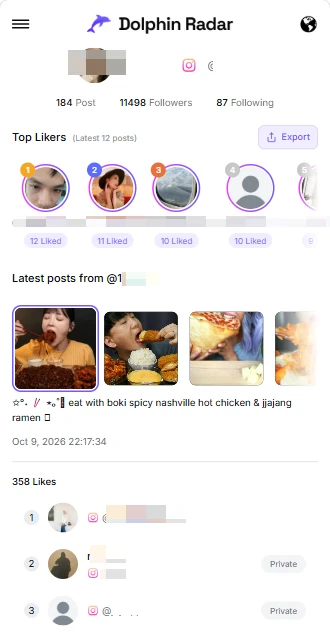
Repeat likers are accounts appearing in the available liker lists for multiple posts being compared. DolphinRadar calls its paid recent-post ranking Top Likers. This describes repeated likes within the posts covered by the tool, rather than an all-time ranking.
| Data point | Useful question | Interpretation limit |
|---|---|---|
| Displayed like count | How much visible like activity did this post receive? | It does not identify every account or measure sales. |
| Available liker list | Which accounts appear for this post? | Loaded records may cover only part of the total. |
| Repeat likes across covered posts | Which accounts appear repeatedly? | Repeated likes do not establish follower status or intent. |
Keep the direction clear: this analysis starts with a post and asks who liked it. It does not retrieve a particular person’s complete history of liked posts.
Choose a Content Question Before Opening a Tool
“Who liked this?” is a starting point. “Do my practical tutorials attract returning engagement?” gives the review a purpose.
A food blogger might compare recipe carousels with restaurant photos. A musician could compare rehearsal clips with release announcements. A freelance social media manager might review educational posts alongside product promotions.
Choose a small group of recent posts with a clear relationship. Where possible, compare posts of similar age and note differences in format, paid promotion, collaborations, and topic. Those factors can affect the comparison, so a difference in likes should lead to a question rather than an immediate conclusion.
A Three-Step Workflow for Reviewing Public Post Likers
For a browser-based workflow, you can review Instagram post likers with DolphinRadar. The service describes a public-username lookup that works without an Instagram login or app download. Paid features require the relevant DolphinRadar access.
1. Enter the Public Profile Username
Enter the Instagram username, confirm that the returned profile is the intended account, and browse its recent posts. Check the profile image and post content before recording results, especially when accounts have similar names.
The documented workflow starts with a username. Private target profiles are not supported.
2. Select a Post and Check the Available List
Open a recent post and review the liker records that load. DolphinRadar advertises a free preview of up to 20 likers per post, with no account required for basic access.
Record the displayed like total separately from the loaded record count. A preview containing 20 accounts is not evidence that only 20 people liked the post, and it should not be treated as a representative audience sample. Its order also does not establish exact like times.
3. Use Search, Top Likers, or Export for a Defined Task
The landing page lists paid username search within loaded results, Top Likers across recent posts, and downloadable liker data. It also advertises access to 1,000+ likers per post; actual availability can vary, so this is not a completeness guarantee.
Use search to check a specific username in the loaded list. A missing result means that username was not found there; it does not prove the account never liked the post.
Use Top Likers to review repeated engagement within the covered recent posts. If you export Instagram post likers for further analysis, check the actual file format, columns, and coverage before building a spreadsheet around them.
A Practical Example for Planning the Next Post
Consider a hypothetical independent illustrator reviewing six recent public posts: three process carousels and three finished-art images. The goal is to decide whether to create another process series.
Suppose one finished-art image has the highest displayed like count, while the available records show several accounts appearing across all three process posts. These are two different observations: one post attracted a larger visible total, and the process posts showed repeated engagement among some observed accounts.
The illustrator could test another process carousel and compare it with a finished-art post after a similar interval. Caption questions or comments could provide additional context. The liker lists alone cannot establish whether those accounts want tutorials, intend to buy artwork, or follow the profile.
If the review used only free previews, the conclusion must stay narrow: recurring accounts appeared in those previews. The data would not justify claiming that process posts retain more of the entire audience.
Keep a Small, Traceable Review Sheet
A simple spreadsheet can make the comparison easier to revisit. Record these fields manually or map available export columns to them:
- Post identifier and topic: enough detail to locate the post again.
- Publication and review dates: to distinguish older posts from newer ones.
- Format: photo, carousel, or Reel.
- Displayed likes and loaded records: kept in separate columns.
- Access and coverage notes: free preview or paid access, plus any missing results.
- Next experiment: one content change to test.
Preserve the original download when available and work from a separate copy. If the interface identifies which posts a Top Likers result covers, record that scope. Leave it unspecified when it is not shown.
For posts you manage, use available native performance metrics alongside liker data. Saves, shares, reach, and relevant business outcomes can help answer questions that likes alone leave open.
Questions About Instagram Likes Viewers
Can I View Post Likes Without Logging Into Instagram?
DolphinRadar says its Likes Viewer works in a browser without an Instagram login for supported public profiles.
Why Can’t I See Everyone Who Liked a Post?
Available records can be limited by the preview, loaded-result coverage, or Instagram visibility restrictions. Compare the loaded count with the displayed total. Hidden like counts alone do not explain every incomplete list.
Does Top Likers Identify a Profile’s Most Loyal Followers?
Top Likers identifies accounts with repeated likes across covered recent posts. It does not confirm that they follow the profile or establish loyalty, purchase intent, or a personal relationship.
Can I Download the Available Liker Data?
DolphinRadar advertises paid exports for individual post likers and Top Likers. Confirm the format, included fields, and available records in the interface before relying on a download for reporting.
Does the Tool Support Private Instagram Profiles?
Private target profiles are not supported. A private-status label on a liker record does not provide access to that account’s private posts.
Turn the Review Into a Content Experiment
DolphinRadar is a useful option when the task extends from viewing one public post’s available likers to searching loaded results or comparing repeated engagement across recent posts. Start with the preview, then decide whether the paid features match your question.
The strongest output is a testable editorial decision: publish another tutorial, revisit a topic, or compare two formats under similar conditions. Keep the coverage beside the finding so the next decision rests on what the data actually shows.